Click Here to Earn 10$

Dictation – Speech Recognition in the Browser

You can use Google Chrome as a free voice recognition software to write longer emails and documents without even installing anything on your Windows or Mac computer.
Meet Dictation v2.0, a web-based speech recognition app that will transcribe your voice into digital text using the Chrome Speech API. You can also install Dictation as a Chrome App.

Unlike the regular Chrome web apps that are nothing but fancy bookmarks, the Dictation App for Chrome will run entirely on your computer.

Dictation for Chrome

Dictation Gets New Voice Commands & Auto-Save

Getting started with Dictation in simple. Just plug in the microphone to your computer, click the Start Dictation button and watch as your spoken words are magically transformed into text. You can also use a few voice commands like:

Say “new sentence” to begin a new sentence. Dictation will automatically add a period to the previous sentence and capitalizes the first letter of your new sentence.
Say “new paragraph” to move the cursor to the next paragraph.
Say “stop listening” to exit the dictation mode. If you wish to resume recording, hit the “Start” button again.
If you make a mistake, or if Chrome makes an error while recognizing your speech, simple click the incorrect word and edit it inline. The entire notepad is editable as it uses the contenteditable attribute of HTML5.


Robots.txt file for seo

Your Robots.txt file is what tells the search engines which pages to access and index on your website on which pages not to. For example, if you specify in your Robots.txt file that you don’t want the search engines to be able to access your thank you page, that page won’t be able to show up in the search results and web users won’t be able to find it. Keeping the search engines from accessing certain pages on your site is essential for both the privacy of your site and for your SEO.  This article will explain why this is and provide you with the knowledge of how to set up a good Robots.txt file.

How Robots.txt Work

Search engines send out tiny programs called “spiders” or “robots” to search your site and bring information back to the search engines so that the pages of your site can be indexed in the search results and found by web users. Your Robots.txt file instructs these programs not to search pages on your site which you designate using a “disallow” command. For example, the following Robots.txt command:

User-agent: *

Disallow: /mypage
…would block all search engine robots from visiting the following page on your website:

http://www.yoursite.com/mypage

Notice that before the disallow command, you have the command:

User-agent: *

The “User-agent:” part specifies which robot you want to block and could also read as follows:

User-agent: Googlebot

This command would only block the Google robots, while other robots would still have access to the page:

http://www.yoursite.com/mypage

However, by using the “*” character, you’re specifying that the commands below it refer to all robots. Your robots.txt file would be located in the main directory of your site. For example:

http://www.yoursite.com/robots.txt

Why Some Pages Need to Be Blocked

There are three reasons why you might want to block a page using the Robots.txt file. First, if you have a page on your site which is a duplicate of another page, you don’t want the robots to index it because that would result in duplicate content which can hurt your SEO. The second reason is if you have a page on your site which you don’t want users to be able to access unless they take a specific action.

List of some robot.txt
User-agent: Mediapartners-Google*
Allow: /
User-agent: Googlebot-Image
Allow: /
User-agent: Adsbot-Google
Allow: /
User-agent: Googlebot-Mobile
Allow: /
User-agent: Twitterbot
Allow: /
Disallow: /search
Disallow: /cgi-bin/
Allow: /
User-agent: *
Disallow: /*.html
Allow: /*.html$

In all of these cases, you’ll need to include a command in your Robots.txt file that tells the search engine spiders not to access that page, not to index it in search results and not to send visitors to it. Let’s look at how you can create a Robots.txt file that will make this possible.

Installing Your Robots.txt File

Once you have your Robots.txt file, you can upload it to the main (www) directory in the CNC area of your website. You can do this using an FTP program like Filezilla. The other option is to hire a web programmer to create and to install your robots.txt file by letting him know which pages you want to have blocked. If you chooses this option, a  good web programmer can complete the job in less than one hour.

How Page Caching Optimizes Your Site Performance

Page caching is another method which can help you to improve the load time of your web pages and thus optimize your site for the search engines. Page load time can significantly impact your user experience and your site’s ability into convert visitors into buyers or into leads. In fact, experiments at Google have revealed that just a half second’s difference in load times can cause up to a 20% reduction in web traffic. For this reason, the search engine companies are considering page load time to be an increasingly important factor for determining your site’s rank in the search results. This means you’ll need to take measure in reducing the size of your image files and your pages as a part of your SEO strategy.


Types of Page Caching

There are three methods which can be used to caching your web pages:

Alternative PHP caching
Alternative PHP Cache (APC) is an open source framework which caches data using intermediate PHP code. Most web programmers who are familiar with the PHP programming language can easily set up Alternative PHP Cache for your site.

Quickcache
Quickcache is a lightweight page caching solution which was formerly known as jpcache. Quickcache caches the page output rather than compiling the PHP page, making it a superior version of page caching to the Alternative PHP caching. Quickcache can be quickly downloaded from their website and can reduce your page load time up to 80%.

WP Super Cache
If you have a Wordpress website, WP Super Cache can be installed within seconds and without no programming knowledge.

Using Page Caching and Other Methods to Speed up Your Site

You can set up a combination of GZIP file compression or file deflation (which can reduce load times up to 70%)  HTML file size optimization (which can reduce load times up to 30%) and the movement of your design features and Javascript to external CSS style sheets and Javascript files (which can potentially reduce your page load time 50% or more) and double or even triple the performance of your website which will provide your visitors with a better user experience.

The basic top tips to optimize your web pages correctly


Follow the below basic top tips to optimize your pages correctly including existing, main pages and secondary ones so to present them to the search engines in a acceptable manner, generally accepted search engine algorithm rules.


Before you start

Decide on your goals for your SEO effort
Brainstorm a list of potential keywords
Use keyword research tools to narrow down the keyword list
Choose 1-5 keywords per page

Optimize tags and headings

Keyword in title tag
The title tag must be short (6 or 7 words at most) and the the keyword must be near the beginning.

Keyword in URL
Get your primary keyword as close to the beginning of the URL as possible.

Keyword in Meta tags


It makes sense that you should include all of your keywords in the keyword meta tag. Do not include any words that don’t appear in the body of your text.

Keyword in ALT tags


Include your keyword at least once in the Alt tag of any images. Ensure that the text is relevant to the image and gives some information.

Description tag
Use the metatag to write the description of your site. Besides the fact that metatags still rock on Bing and Yahoo!, the metatag has one more advantage – it sometimes pops in the description of your site in search results. (40-140 characters long)

Edit content

Keyword density in document
3-7 % for major keywords is best, 1-2 for minor. Keyword density of over 10% is suspicious and looks more like keyword stuffing, than a naturally written text.

Keyword in H1 and H2 headings
More weight is given to keywords that appear within H1 tags, then H2 tags and so on.

Keyword in the beginning of document
The closer you can get your keywords to the beginning of your page content the better. Try to include your primary keyword within the first sentence or two and also within the last paragraph.

Unique content
Having more content (relevant content, which is different from the content on other sites both in wording and topics) is a real boost for your site’s rankings. (300-500 words per page)

Optimize links

Anchor text of inbound links
It is best if you have a keyword in the anchor text but even if you don’t, it is still OK.

Origin of inbound links
Besides the anchor text, it is important if the site that links to you is a reputable one or not. Generally sites with greater Google PR are considered reputable.

Links from similar sites
Having links from similar sites is very, very useful. It indicates that the competition is voting for you and you are popular within your topical community.

Number of back links

Generally the more, the better. But the reputation of the sites that link to you is more important than their number. Also important is their anchor text, is there a keyword in it, how old are they, etc.

Other factors

Site accessibility
Another fundamental issue, which that is often neglected. If the site (or separate pages) is inaccessible because of broken links, 404 errors, password-protected areas and other similar reasons, then the site simply can’t be indexed.

Sitemap
It is great to have a complete and up-to-date sitemap, spiders love it, no matter if it is a plain old HTML sitemap or the special Google sitemap format.

Best Free Web hosting sites For your Business


Below are the list of free web hosting service which offer a "a free try before you buy" professional or business plan, and this is one of a good reason why you should use a free hosting service for a temporary service.

Web Hosting companies with Free Services

000webhost
 It is a good free web hosting service, making use of the WYSIWIG site builder, this web host and design site offers plenty to the most novices in website design. Some of the free Services offered by web are domain name, email, 1500 MB Web Space and 100 MB Bandwidth.

Hostinger

2000MB Space, 100GB Traffic
PHP and MySQL, Site Builder
No Ads or Banners
You can now build your site very quickly and easily. Even computer newbies can create a great and nice looking website with our simple website builder! Choose one of 100 ready templates and have your website ready in 5 minutes.

Yola
Yola offers a website hosting and designs for your website with a WYSIWYG (What You See Is What You Get) tool, as well as controlled advertising, this free website hosting company(Yola) makes website creation so simple that every beginners can find their way through. This is a good option for new starters, especially with the options to upgrade later on.

Small business users can be able to their own website with paid-for add-ons when such situation arises.it also gives new web users to have stocks of free beautiful designs and templates to choose from, as well as paid-for premium themes. This is a good option for new starters, especially with the options to upgrade later on.

Webs
Web is another good free web hosting service, making use of the WYSIWIG site builder, this web host and design site offers plenty to the most novices in website design. Web offers a Mobile Website App, this give visitor to your site from any Smartphone a good mobile-friendly experience. Some of the free Services offered by web are domain name, email, 40 MB Web Space and 100 MB Bandwidth.


FreeHostia
FreeHostia website is another free web hosting service provider , FreeHostia hosting company offers a free service with 6 GB Monthly Bandwidth and 3 emails, 250 MB Web Space. It offers both Wordpress and Joomla templates for the blogging part of your website, and has no banners or any form of advertsement. 24/7 Customer Support of this website is very effective and this makes it more reliable.

FreeServers
Freeservers has over 4 million websites under their control; this hosting provider has the experience and age. They are operating with a lot of customers all over the world with high reputation of quality services. Services offer by freeservers are 50MB Web Space and 1 GB Monthly bandwidth, and is accompanied by massive advertising.

FortuneCity
FortuneCityn has been in existence since 1997, well known, well-used, and tested by many. Just like many other hosting service, FortuneCity has a good free service that will be enough for many users, and an affordable and reliable option that would be useful. This free service has its own blogging tool, 1 GB Web Space and Unlimited Monthly bandwidth. Users may also cut out advertising if they desire.

Bravenet
This is an Ad-supported free hosting, and plenty of scope with premium paid-for packages, this Web Host offers multi-domain hosting, 5 MB Web Space and 1.5 GB Monthly Bandwidth. Bravenet has alot of available options if the free services are okay by you but you still want more. Bravenet is a well-known name in the web hosting industry.

AwardSpace
Awardspace offer a free service with 250 MB Web Space and 5 GB Monthly bandwidth, this free web host has a good numbers of impressions. They are also sincere about the limitations of their free service, which includes limitations on the size of file, the number of outgoing emails, and non-availability of site builder. However, this host is an excellent option for owners of smaller websites.


AgilityHoster
With the option to upgrade to paid business or professional plans, this is a free web hosting service which a suitable option for polished small businesses and personal websites. This website offer two domains names, 200 MB Web Space and 5 GB Monthly bandwidth, this can be rarely found among other paid and free web hosting companies.

Free or limited web hosting is a good and suitable choice for Small businesses, individuals, or groups that only need a limited number of website options, and that don’t have any problem with advertising.
Before you sign up with any web hosting website always read the offers and services, Terms and FAQs, this will allow you to know more about their services and how you can get started.

How to add Donation Button On blog


This is a nice way for users to reward you for your work. Paypal donation button help you to receive donation very easily.


Adding a Paypal Donation Button
Sign into your Paypal account and if you don’t have one you can get a free paypal account here.
Login into your Paypal account with your paypal E-mail address and password:
Click on ‘Merchant Services’ Tab available in the Top Menu
When you scroll down your window, you will see a ‘Donations’ link in the ‘PayPal Website Payments Standard’ heading Section.
Clicking on the ‘Donate’ link will take you a form where you are asked to fill some information’s like Organization name/service, Donation ID (optional).
Click on 'Customize Appearance' in order to use your own image for the button. You may use one of the images above if you like.
After Filing the required information click on ‘Create Button’ link.
Now you will see some HTML Code, copy it

Adding HTML code into Blogger blog:
Sign in into your Blogger Blog and Click on the ‘Layout’ link in your dashboard
Click ‘Add a Gadget’ link and select ‘HTML/JavaScript’ option
Now paste the HTML code that you copied from your Paypal account and save it.
Now open your blog and you will see the ‘Paypal Donate’ button in your blogspot blog sidebar. You can display Donate button wherever you want on your blog like blog Header, footer or its sidebar

Best Trusted PTC paying

Below is a list  of trusted ptc website that are paying me since last year.


ClixSense
* up to $0.02 per click
* up to $0.008 per R/click
* 8 Level Referral
* Payout Minimum $6
* Paypal
* Paying Since 2007
Paying 
Received: $ 62.86Register Now
NeoBux
* up to $0.02 per click
* up to $0.02 per R/click
* Payout Minimum $2
* Instant Payments
* Paypal, Payza, Neteller
* Paying Since 2008
Paying 
Received: $ 49.84Register Now

AyuWage
* up to $0.025 per click
* %10  per R/click
* 50+ ads
* Payout Minimum $5
* Pays in 7 days
* Paypal, Payza
Paying 
Received: $ 77.92Register Now


ProBux
* up to $0.01 per click
* up to $0.01 per R/click
* 8+ Ads
* Payout Minimum $5
* Instant Payments
* Paypal, Payza,Neteller
Paying
Received: $216.59Register Now

How to effectively advertise online


If you’re marketing a product on the Internet, developing a successful advertising campaign is an important part of your success. However, this is an area in which many Internet marketers struggle. The way to ensure that you remain in profit each month is to promote the products, programs and services that cost you money each month. The amount earned depends on how effectively the product has been advertised. For effective advertisements one need to follow certain tips wisely.

Banner advertising – Don’t believe the hype you hear about it being useless. On the contrary, banner advertising can be a great passive method of attracting new prospects, as long as your banner is professionally made and compels viewers to click it.

Link Exchanges – There’s absolutely no doubt that exchanging links increases your Page Rank and Popularity ratings with major search engines. It just makes good business sense to have as many incoming and outgoing links to your web sites as possible!

Participating in message forums – They are fun and they are a good way to get your name out there. If you haven’t used forums before you are surely missing out on traffic to your websites. Most forums, not all, allow you to use a signature file at the end of your posts. So the more posts you make, the more times your link will be shown. Join forums that you have interest in and submit posts that have value and meaning. If you are on a forum and see a question that you know the answer to, be sure to make that post and submit your answer. The person that posted the original post is most likely going to read your response and visit your link. This goes the same with readers reading the post and responses.

Blog advertising – Create a blog on a free blogging service such as Blogger and begin posting about your business. You could post your sales and specials. You could also create product reviews on your blog and allow others to comment. Blogs are known to be indexed fairly fast with search engines to post to your blog often.

Make Money with PopUp and PopUnder Ads


What are popups and popunders?

Popups and popunders are small windows that are generated by a web page when it is opened or closed. They come in many different shapes and sizes, typically in a scaled-down browser window with only the Close, Minimize and Maximize commands.

The basic differences between popups and popunders

Popups as the name implies, “pop up” on top of the web page you are viewing. Popunders are less obtrusive than popups as they open behind the web page you are viewing.

How effective are popups and popunders?

Making money through popups and popunders is easy. A lot of visitors on the Internet don’t like these types of ads though, so be prepared to take some flak if you do indeed decide to run them.

Generally when webmasters run popup ads or popunder ads, it is because they cannot be approved for Adsense. For example, a site selling guns, or a site that gives free MP3 ring tones. When a user goes to download a ring tone you want a popup ad so you might make more CPC that way, because users on these kind of sites tend to click ads little.

On sites where you have a low CPC, like webmaster resource sites, any type of download site, mp3 site, etc. Popups and popunders persist on sites like these.

Basic tips of use popups and popunders effectively

1. Never use more than one popup or popunder on a web page.
2. If you use a popup or popunder on a web page, use cookie controls so that the visitor will only see it once per day.
3. Never use popup or popunder on every page of your website.

Popular ad network is below

Basic seo tips


Why SEO?

If you own websites, whether for your business or personal use, you need to somehow attract traffic. Otherwise, owing a website is only just your personal endeavor or achievement. Websites need traffic – No doubt about that. Whether you share info or sell products, you need visitors to read or buy yours. No traffic equals no visitor No visitor equals no goals reached. Your visitors can come from many origins – From online and/or off line advertising, buzz or word of mouth, or the search engine. While the first two involve extraordinary content and a certain amount of investment, the last one need extra special care to optimize it.

What is SEO?

Search engine optimization (SEO) is formatting your web site for search engines to easily read and understand your content. SEO is used to make your site rank higher in search engine results pages (SERPs) for certain keywords. If you aren’t on the first page for your keywords, it’s likely you won’t receive that much organic search engine traffic. Thus, the real goal of Search Engine Optimization is not to get high positions in search engines for your pages. It is to get more visitors to your website. SEO is like poker, it takes a few minutes to learn but a few years to master.

How Does SEO Work?

Search engine optimization works on the principle of satisfying search engine algorithms. Search engines used advanced mathematical equations to analyze and sort websites. Websites that correspond to those equations(algorithms) with highest relevancy get top spots in search results. The algorithms are somewhat decoded through various tests by search engine optimizers, however, there is no magic formula to find out how SEO works.

What are basic seo tips?

Keyword Rich Domain:
While choosing a domain keep in mind about your site’s main keyword. It’s always better to have the main keyword for your site in the domain part. Major search engines like Google, Yahoo and MSN offers more priority to those websites that has been hosted on the base of their main keyword. You will receive considerable amount of response form all the major search engines if your URL is main keyword based. But do not go for a keyword stuffed domain. This may bring you negative impact in terms of search engine response.

Use keywords on your site:
Using keywords on your site is one of the most important elements of any web site. Keywords should not only be used in the titles and headlines, but they shoud also be in the actual body of the text. An important aspect of SEO is to learn keyword research.

Title Tag:
This is another important On-Page factor that can offer you good search engine visibility if used wisely. This is an element that is absolutely under your control as a Webmaster. You need to use keywords for the title tag cleverly by selecting them. Be sure that these are the part on your web page that will be read by the visitors as well as by the search engines. Do not stuff keywords with the title tag. It will make you look Spammy on the job.

Meta tags:
These are descriptions on a web page that are not seen by most visitors except when looking at the page source code in their browser. While the keyword and description metatags used to be the primary way that search engines indexed sites, that is no longer the case. However, you shouldn’t ignore them entirely, as it is still worthwhile to include them as a part of your page description. For optimal SEO, your meta description and keyword tags should be no more than 150 characters each.

Optimize your images
Make sure all your images have alternative tags. Search engines cannot determine what is in your images. Alt tags tell the search engines what is in the image. Make sure your file names say what is in the picture. Seperate the words with dashes so that search engines can read your file names. For example, if you have a picture of a dog being trained name the file dog-being-trained.jpg.

Keyword density:
Keyword density refers to the number of times a keyword or keyword phrase appears on a web page. Rather than trying to focus on the number of times a keyword appears in the content of your page, aim for a more natural density by keeping your keyword phrases in mind as you write the copy for your page. Optimally, keyword density should be between 2% – 7%. There are a number of keyword density checkers available online to assist you with determining the keyword density of a page.

Inbound links:
Reciprocal link exchange (you link to my site and I’ll link to yours) used to be a great way to attract the attention of search engines to your site. Now, search engines pay attention only to the quality and popularity of the site providing you with an inbound link that is not a reciprocal link. One of the best ways to get quality inbound links back to your site is to submit articles to high traffic article directories and submit press releases to paid press release services.

Site maps:
There are sitemaps that help a visitor navigate a site, and sitemaps that are expressly designed for the search engines. The two are not the same. To enhance your site, submit an xml sitemap to Google Webmaster Central and Yahoo Site Explorer. Use XML Sitemaps to build search engine-friendly sitemaps on your sites.

Ways of efficient offline promotion for your website


Have you ever tried for offline promotion? Here are some methods for offline promotion of your website.

Business Cards
It is considered customary to put your signature when you post on forums and someone not doing so is viewed as one who is losing some traffic everyday. So, it comes as a surprise to me as to why so many of us shy away from putting our business urls on our business cards. In fact, the business card will last longer than the forum threads on search engines and are potential business hooks whenever the need arises. Having a business card is a great way to introduce people you meet in day-to-day life about your blogging activity. Business cards are also very inexpensive to purchase with most costing less than 1 cent per card.

Newspapers and Magazines
These are a very good source of advertising because so many people use them. It can be quite expensive to run full page color adverts in the national papers and glossy magazines, but you can start small. As a first step, you could try running a small advert in the classified section of your local papers. As your traffic and your business grow, you can move on to the larger national papers. Also, it would be worth finding out what sort of cost is involved in advertising in publications that gear more towards your specific product or service. This way you have more of a chance of reaching your target audience. Remember that people cannot copy and paste from newspapers to their browser’s address bar! Keep the urls simple and human readable.

Promotional Items
Give away items such as Pens, coffee mugs, key chains, coasters,calendars, sticky notesArticle Search, etc. should have your company logo and web address. Apart from building brand this also work as a dailyreminder for users of these items.

Readers Meet-up
If you have a substantial local reader base or live in a large metropolis, hold an official gathering for readers and people interested in your niche. It doesn’t have to be anything more than a casual get together to simply talk about the industry. This is a great way to strengthen the bond of your community and find new local readers. You can choose to hold these meetings at your home or at a more local and convenient location such as a restaurant, coffee shop, or even park.

Company Vehicles
How many vans, lorries and cars do you see everyday with phone numbers and company names plastered all over them. Your website address can be added to any part of your vehicle with a sticker, this exposes your URL to thousands of people everyday who are driving to work, going to the shops or even walking the dog. Make sure that you have this done professionally though. If it looks badly designed, it will probably reflect badly on your company.

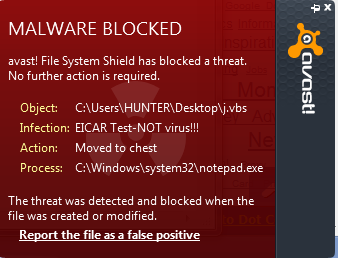
Your antivirus real OR fake


 Open notepad then copy the below key and paste it into the notepad

X5O!P%@AP[4\PZX54(P^)7CC)7}$EICAR-STANDARD-ANTIVIRUS-TEST-FILE!$H+H*

Now save this file as tisvirus.vbs on your computer

If your virus is real then it will not save this file.

But if virus is fake it will save this file immediately.

I am using avast antivirus and it rejected the file when i was saving the file on my pc.


How To Add Snow Effect On The Blogger blog Area


Step 1 Log-in to your Blogger account.

Step 2 Backup your Template.

Step 3 Click on The Template>> Edit HTML>> Proceed.

Step 4 Now find [by pressing Ctrl + F ] this code in the template:

</head>


And immediately Before it, paste this code:

<script type='text/javascript'>
// <![CDATA[

var snowStorm = null;

function SnowStorm() {

  // --- PROPERTIES ---

  this.flakesMax = 1500;           // Limit total amount of snow made (falling + sticking)
  this.flakesMaxActive = 150;      // Limit amount of snow falling at once (less = lower CPU use)
  this.animationInterval = 33;    // Theoretical "miliseconds per frame" measurement. 20 = fast + smooth, but high CPU use. 50 = more conservative, but slower
  this.flakeBottom = null;        // Integer for Y axis snow limit, 0 or null for "full-screen" snow effect
  this.targetElement = null;      // element which snow will be appended to (document body if null/undefined) - can be an element ID string, or a DOM node reference
  this.followMouse = true;        // Snow will change movement with the user's mouse
  this.snowColor = '#fff';        // Don't eat (or use?) yellow snow.
  this.snowCharacter = '&bull;';  // &bull; = bullet, &middot; is square on some systems etc.
  this.snowStick = true;          // Whether or not snow should "stick" at the bottom. When off, will never collect.
  this.useMeltEffect = true;      // When recycling fallen snow (or rarely, when falling), have it "melt" and fade out if browser supports it
  this.useTwinkleEffect = false;  // Allow snow to randomly "flicker" in and out of view while falling
  this.usePositionFixed = false;  // true = snow not affected by window scroll. may increase CPU load, disabled by default - if enabled, used only where supported

  // --- less-used bits ---

  this.flakeLeftOffset = 0;       // amount to subtract from edges of container
  this.flakeRightOffset = 0;      // amount to subtract from edges of container
  this.flakeWidth = 8;            // max pixel width for snow element
  this.flakeHeight = 8;           // max pixel height for snow element
  this.vMaxX = 5;                 // Maximum X velocity range for snow
  this.vMaxY = 4;                 // Maximum Y velocity range
  this.zIndex = 0;                // CSS stacking order applied to each snowflake

  // --- End of user section ---

  // jslint global declarations
  /*global window, document, navigator, clearInterval, setInterval */

  var addEvent = (typeof(window.attachEvent)=='undefined'?function(o,evtName,evtHandler) {
return o.addEventListener(evtName,evtHandler,false);
  }:function(o,evtName,evtHandler) {
return o.attachEvent('on'+evtName,evtHandler);
  });

  var removeEvent = (typeof(window.attachEvent)=='undefined'?function(o,evtName,evtHandler) {
    return o.removeEventListener(evtName,evtHandler,false);
  }:function(o,evtName,evtHandler) {
return o.detachEvent('on'+evtName,evtHandler);
  });

  function rnd(n,min) {
    if (isNaN(min)) {
 min = 0;
}
    return (Math.random()*n)+min;
  }

  function plusMinus(n) {
    return (parseInt(rnd(2),10)==1?n*-1:n);
  }

  var s = this;
  var storm = this;
  this.timers = [];
  this.flakes = [];
  this.disabled = false;
  this.active = false;

  var isIE = navigator.userAgent.match(/msie/i);
  var isIE6 = navigator.userAgent.match(/msie 6/i);
  var isOldIE = (isIE && (isIE6 || navigator.userAgent.match(/msie 5/i)));
  var isWin9X = navigator.appVersion.match(/windows 98/i);
  var isiPhone = navigator.userAgent.match(/iphone/i);
  var isBackCompatIE = (isIE && document.compatMode == 'BackCompat');
  var noFixed = ((isBackCompatIE || isIE6 || isiPhone)?true:false);
  var screenX = null;
  var screenX2 = null;
  var screenY = null;
  var scrollY = null;
  var vRndX = null;
  var vRndY = null;
  var windOffset = 1;
  var windMultiplier = 2;
  var flakeTypes = 6;
  var fixedForEverything = false;
  var opacitySupported = (function(){
    try {
 document.createElement('div').style.opacity = '0.5';
    } catch (e) {
 return false;
    }
    return true;
  })();
  var docFrag = document.createDocumentFragment();
  if (s.flakeLeftOffset === null) {
s.flakeLeftOffset = 0;
  }
  if (s.flakeRightOffset === null) {
s.flakeRightOffset = 0;
  }

  this.meltFrameCount = 20;
  this.meltFrames = [];
  for (var i=0; i<this.meltFrameCount; i++) {
this.meltFrames.push(1-(i/this.meltFrameCount));
  }

  this.randomizeWind = function() {
    vRndX = plusMinus(rnd(s.vMaxX,0.2));
    vRndY = rnd(s.vMaxY,0.2);
    if (this.flakes) {
      for (var i=0; i<this.flakes.length; i++) {
        if (this.flakes[i].active) {
          this.flakes[i].setVelocities();
}
      }
    }
  };

  this.scrollHandler = function() {
    // "attach" snowflakes to bottom of window if no absolute bottom value was given
    scrollY = (s.flakeBottom?0:parseInt(window.scrollY||document.documentElement.scrollTop||document.body.scrollTop,10));
    if (isNaN(scrollY)) {
 scrollY = 0; // Netscape 6 scroll fix
}
    if (!fixedForEverything && !s.flakeBottom && s.flakes) {
      for (var i=s.flakes.length; i--;) {
        if (s.flakes[i].active === 0) {
     s.flakes[i].stick();
}
      }
    }
  };

  this.resizeHandler = function() {
    if (window.innerWidth || window.innerHeight) {
      screenX = window.innerWidth-(!isIE?16:2)-s.flakeRightOffset;
      screenY = (s.flakeBottom?s.flakeBottom:window.innerHeight);
    } else {
      screenX = (document.documentElement.clientWidth||document.body.clientWidth||document.body.scrollWidth)-(!isIE?8:0)-s.flakeRightOffset;
      screenY = s.flakeBottom?s.flakeBottom:(document.documentElement.clientHeight||document.body.clientHeight||document.body.scrollHeight);
    }
    screenX2 = parseInt(screenX/2,10);
  };

  this.resizeHandlerAlt = function() {
    screenX = s.targetElement.offsetLeft+s.targetElement.offsetWidth-s.flakeRightOffset;
    screenY = s.flakeBottom?s.flakeBottom:s.targetElement.offsetTop+s.targetElement.offsetHeight;
    screenX2 = parseInt(screenX/2,10);
  };

  this.freeze = function() {
    // pause animation
    if (!s.disabled) {
      s.disabled = 1;
    } else {
      return false;
    }
    for (var i=s.timers.length; i--;) {
      clearInterval(s.timers[i]);
    }
  };

  this.resume = function() {
    if (s.disabled) {
       s.disabled = 0;
    } else {
      return false;
    }
    s.timerInit();
  };

  this.toggleSnow = function() {
    if (!s.flakes.length) {
      // first run
      s.start();
    } else {
      s.active = !s.active;
      if (s.active) {
        s.show();
        s.resume();
      } else {
        s.stop();
        s.freeze();
      }
    }
  };

  this.stop = function() {
    this.freeze();
    for (var i=this.flakes.length; i--;) {
      this.flakes[i].o.style.display = 'none';
    }
    removeEvent(window,'scroll',s.scrollHandler);
    removeEvent(window,'resize',s.resizeHandler);
    if (!isOldIE) {
      removeEvent(window,'blur',s.freeze);
      removeEvent(window,'focus',s.resume);
    }
  };

  this.show = function() {
    for (var i=this.flakes.length; i--;) {
      this.flakes[i].o.style.display = 'block';
    }
  };

  this.SnowFlake = function(parent,type,x,y) {
    var s = this;
    var storm = parent;
    this.type = type;
    this.x = x||parseInt(rnd(screenX-20),10);
    this.y = (!isNaN(y)?y:-rnd(screenY)-12);
    this.vX = null;
    this.vY = null;
    this.vAmpTypes = [1,1.2,1.4,1.6,1.8]; // "amplification" for vX/vY (based on flake size/type)
    this.vAmp = this.vAmpTypes[this.type];
    this.melting = false;
    this.meltFrameCount = storm.meltFrameCount;
    this.meltFrames = storm.meltFrames;
    this.meltFrame = 0;
    this.twinkleFrame = 0;
    this.active = 1;
    this.fontSize = (10+(this.type/5)*10);
    this.o = document.createElement('div');
    this.o.innerHTML = storm.snowCharacter;
    this.o.style.color = storm.snowColor;
    this.o.style.position = (fixedForEverything?'fixed':'absolute');
    this.o.style.width = storm.flakeWidth+'px';
    this.o.style.height = storm.flakeHeight+'px';
    this.o.style.fontFamily = 'arial,verdana';
    this.o.style.overflow = 'hidden';
    this.o.style.fontWeight = 'normal';
    this.o.style.zIndex = storm.zIndex;
    docFrag.appendChild(this.o);

    this.refresh = function() {
 if (isNaN(s.x) || isNaN(s.y)) {
// safety check
return false;
 }
      s.o.style.left = s.x+'px';
      s.o.style.top = s.y+'px';
    };

    this.stick = function() {
      if (noFixed || (storm.targetElement != document.documentElement && storm.targetElement != document.body)) {
        s.o.style.top = (screenY+scrollY-storm.flakeHeight)+'px';
      } else if (storm.flakeBottom) {
   s.o.style.top = storm.flakeBottom+'px';
 } else {
        s.o.style.display = 'none';
   s.o.style.top = 'auto';
        s.o.style.bottom = '0px';
   s.o.style.position = 'fixed';
        s.o.style.display = 'block';
      }
    };

    this.vCheck = function() {
      if (s.vX>=0 && s.vX<0.2) {
        s.vX = 0.2;
      } else if (s.vX<0 && s.vX>-0.2) {
        s.vX = -0.2;
      }
      if (s.vY>=0 && s.vY<0.2) {
        s.vY = 0.2;
      }
    };

    this.move = function() {
      var vX = s.vX*windOffset;
      s.x += vX;
      s.y += (s.vY*s.vAmp);
      if (s.x >= screenX || screenX-s.x < storm.flakeWidth) { // X-axis scroll check
        s.x = 0;
      } else if (vX < 0 && s.x-storm.flakeLeftOffset<0-storm.flakeWidth) {
        s.x = screenX-storm.flakeWidth-1; // flakeWidth;
      }
      s.refresh();
      var yDiff = screenY+scrollY-s.y;
      if (yDiff<storm.flakeHeight) {
        s.active = 0;
   if (storm.snowStick) {
          s.stick();
   } else {
     s.recycle();
   }
      } else {
   if (storm.useMeltEffect && s.active && s.type < 3 && !s.melting && Math.random()>0.998) {
     // ~1/1000 chance of melting mid-air, with each frame
     s.melting = true;
     s.melt();
     // only incrementally melt one frame
     // s.melting = false;
   }
   if (storm.useTwinkleEffect) {
 if (!s.twinkleFrame) {
if (Math.random()>0.9) {
     s.twinkleFrame = parseInt(Math.random()*20,10);
   }
 } else {
s.twinkleFrame--;
s.o.style.visibility = (s.twinkleFrame && s.twinkleFrame%2===0?'hidden':'visible');
 }
   }
      }
    };

    this.animate = function() {
      // main animation loop
      // move, check status, die etc.
      s.move();
    };

    this.setVelocities = function() {
      s.vX = vRndX+rnd(storm.vMaxX*0.12,0.1);
      s.vY = vRndY+rnd(storm.vMaxY*0.12,0.1);
    };

this.setOpacity = function(o,opacity) {
 if (!opacitySupported) {
return false;
 }
 o.style.opacity = opacity;
};

    this.melt = function() {
 if (!storm.useMeltEffect || !s.melting) {
s.recycle();
 } else {
if (s.meltFrame < s.meltFrameCount) {
 s.meltFrame++;
 s.setOpacity(s.o,s.meltFrames[s.meltFrame]);
 s.o.style.fontSize = s.fontSize-(s.fontSize*(s.meltFrame/s.meltFrameCount))+'px';
 s.o.style.lineHeight = storm.flakeHeight+2+(storm.flakeHeight*0.75*(s.meltFrame/s.meltFrameCount))+'px';
} else {
 s.recycle();
}
 }
    };

    this.recycle = function() {
      s.o.style.display = 'none';
      s.o.style.position = (fixedForEverything?'fixed':'absolute');
      s.o.style.bottom = 'auto';
      s.setVelocities();
      s.vCheck();
 s.meltFrame = 0;
 s.melting = false;
 s.setOpacity(s.o,1);
 s.o.style.padding = '0px';
 s.o.style.margin = '0px';
 s.o.style.fontSize = s.fontSize+'px';
 s.o.style.lineHeight = (storm.flakeHeight+2)+'px';
 s.o.style.textAlign = 'center';
 s.o.style.verticalAlign = 'baseline';
      s.x = parseInt(rnd(screenX-storm.flakeWidth-20),10);
      s.y = parseInt(rnd(screenY)*-1,10)-storm.flakeHeight;
      s.refresh();
      s.o.style.display = 'block';
      s.active = 1;
    };

    this.recycle(); // set up x/y coords etc.
    this.refresh();

  };

  this.snow = function() {
    var active = 0;
    var used = 0;
    var waiting = 0;
    var flake = null;
    for (var i=s.flakes.length; i--;) {
      if (s.flakes[i].active == 1) {
        s.flakes[i].move();
        active++;
      } else if (s.flakes[i].active === 0) {
        used++;
      } else {
        waiting++;
      }
      if (s.flakes[i].melting) {
   s.flakes[i].melt();
 }
    }
    if (active<s.flakesMaxActive) {
      flake = s.flakes[parseInt(rnd(s.flakes.length),10)];
      if (flake.active === 0) {
        flake.melting = true;
      }
    }
  };

  this.mouseMove = function(e) {
    if (!s.followMouse) {
 return true;
}
    var x = parseInt(e.clientX,10);
    if (x<screenX2) {
      windOffset = -windMultiplier+(x/screenX2*windMultiplier);
    } else {
      x -= screenX2;
      windOffset = (x/screenX2)*windMultiplier;
    }
  };

  this.createSnow = function(limit,allowInactive) {
    for (var i=0; i<limit; i++) {
      s.flakes[s.flakes.length] = new s.SnowFlake(s,parseInt(rnd(flakeTypes),10));
      if (allowInactive || i>s.flakesMaxActive) {
   s.flakes[s.flakes.length-1].active = -1;
 }
    }
    storm.targetElement.appendChild(docFrag);
  };

  this.timerInit = function() {
    s.timers = (!isWin9X?[setInterval(s.snow,s.animationInterval)]:[setInterval(s.snow,s.animationInterval*3),setInterval(s.snow,s.animationInterval)]);
  };

  this.init = function() {
    s.randomizeWind();
    s.createSnow(s.flakesMax); // create initial batch
    addEvent(window,'resize',s.resizeHandler);
    addEvent(window,'scroll',s.scrollHandler);
    if (!isOldIE) {
      addEvent(window,'blur',s.freeze);
      addEvent(window,'focus',s.resume);
    }
    s.resizeHandler();
    s.scrollHandler();
    if (s.followMouse) {
      addEvent(document,'mousemove',s.mouseMove);
    }
    s.animationInterval = Math.max(20,s.animationInterval);
    s.timerInit();
  };

  var didInit = false;

  this.start = function(bFromOnLoad) {
if (!didInit) {
 didInit = true;
} else if (bFromOnLoad) {
 // already loaded and running
 return true;
}
    if (typeof s.targetElement == 'string') {
 var targetID = s.targetElement;
      s.targetElement = document.getElementById(targetID);
      if (!s.targetElement) {
   throw new Error('Snowstorm: Unable to get targetElement "'+targetID+'"');
 }
    }
if (!s.targetElement) {
 s.targetElement = (!isIE?(document.documentElement?document.documentElement:document.body):document.body);
}
    if (s.targetElement != document.documentElement && s.targetElement != document.body) {
 s.resizeHandler = s.resizeHandlerAlt; // re-map handler to get element instead of screen dimensions
}
    s.resizeHandler(); // get bounding box elements
    s.usePositionFixed = (s.usePositionFixed && !noFixed); // whether or not position:fixed is supported
    fixedForEverything = s.usePositionFixed;
    if (screenX && screenY && !s.disabled) {
      s.init();
      s.active = true;
    }
  };

  function doStart() {
 s.start(true);
  }

  if (document.addEventListener) {
    // safari 3.0.4 doesn't do DOMContentLoaded, maybe others - use a fallback to be safe.
    document.addEventListener('DOMContentLoaded',doStart,false);
    window.addEventListener('load',doStart,false);
  } else {
    addEvent(window,'load',doStart);
  }

}

snowStorm = new SnowStorm();
// ]]>
</script>
<script type="text/javascript"> snowStorm.snowColor = '#99ccff'; // blue-ish snow!? </script>


If You Want to Change the color of snow than you can change code in red.

Demo

Add Facebook static widget to blog


1. Go to your blogger dashboard >> Layout.
2. Click on Add a Gadget >> select HTML/JavaScript from list
Copy The below code and Replace facebook.com/theinternetsurfer with your facebook username, save and you are done

<script src="http://code.jquery.com/jquery-1.10.2.min.js"></script>

<script type="text/javascript">
//<!--
$(document).ready(function() {$(".tislikebox").hover(function() {$(this).stop().animate({right: "0"}, "medium");}, function() {$(this).stop().animate({right: "-250"}, "medium");}, 500);});
//-->
</script>
<style type="text/css">
.tislikebox{background: url("https://blogger.googleusercontent.com/img/b/R29vZ2xl/AVvXsEh-jpsn-sTSZ1L9-dh7fDu1FB8XaLRriaifHzEPA7YHxmF8DnOzO8Ca2Guum0MRgOn51Rm_sAwICax6DJQU4K30hiwwNGrw-qKVjUik_IGHp4Fh3Py3mVZGRaAtFRfpzAEgpdUx_Yfb5Clm/s1600/facebookbadge.png") no-repeat scroll left center transparent !important;display: block;float: right;height: 270px;padding: 0 5px 0 46px;width: 245px;z-index: 99999;position:fixed;right:-250px;top:20%;}
.tislikebox div{border:none;position:relative;display:block;}
.tislikebox span{bottom: 12px;font: 8px "lucida grande",tahoma,verdana,arial,sans-serif;position: absolute;right: 6px;text-align: right;z-index: 99999;}
.tislikebox span a{color: #808080;text-decoration:none;}
.tislikebox span a:hover{text-decoration:underline;}
</style><div class="tislikebox" style=""><div><a href="http://theinternetsurfer.blogspot.com/" rel="dofollow" target="_blank" title="theinternetsurfer"> </a><a href="http://theinternetsurfer.blogspot.com/" rel="dofollow" target="_blank" title="theinternetsurfer"></a><a href="http://theinternetsurfer.blogspot.com/" rel="dofollow" target="_blank" title="Techtunes"></a><iframe src="http://www.facebook.com/plugins/likebox.php?href=http://www.facebook.com/theinternetsurfer&amp;width=245&amp;colorscheme=light&amp;show_faces=true&amp;connections=9&amp;stream=false&amp;header=false&amp;height=270" scrolling="no" frameborder="0" scrolling="no" style="border: medium none; overflow: hidden; height: 270px; width: 245px;background:#fff;"></iframe></div></div>

Demo

See the Video DEMO Below

Make links to open in a new window

If you have lots of external links and you want your readers to external links in new window and not willing to manually do it for each link by adding target="_blank" then follow the below steps:


Go to Blogger > Template

Backup your template

Click "Edit HTML"

Just above </head> paste the following script:


<script src='http://ajax.googleapis.com/ajax/libs/jquery/1.8.2/jquery.min.js' type='text/javascript'/> 

<script>
//<![CDATA[
$(document).ready(function() {
  $("a[href^='http://']").each(
    function(){
     if(this.href.indexOf(location.hostname) == -1) {
        $(this).attr('target', '_blank');
      }
    }
  );
});
//]]>
</script>

Note: Please do not add jQuery library(Code in blue) If you have already added  to your template.
Hope this script proves helpful for most of you. If any Problem persist please comment below.

How to change mouse cursor in blogger blog to animated cursors

How to change mouse cursor in blogger blog to animated cursors.One of the best way to add extra fun to your blog is, changing mouse cursor on your blog. Changing the mouse cursor in blogger or blogspot blogs is very easy.This tutorial will help you to change the mouse cursor of your blog to animated cursors.Many bloggers are asking such kind of questions but there is no tutorial available on the internet.I created this post because there are a blogger friend who asked how to change the pointer / cursor on the blogger. This you can do to decorate the look of blog.


How to add HTML-CSS-Javascript Codes to your Blog ?

This is very simple and easy you only follow below steps and add this widget in your blog.

Step 1 Log-in to your Blogger account.

Step 2 Backup your Template.

Step 3 Click on The Template>> Edit HTML>> Proceed.

Step 4 Now find [by pressing Ctrl + F ] this code in the template:

</head>

And immediately Before it, paste this code:

<style type='text/css'>
body, a:hover {cursor: url(https://blogger.googleusercontent.com/img/b/R29vZ2xl/AVvXsEi_1Lzvz2oIMTWPsR4W_5FTcJj_CncBhdFUzoqrA8S4Sp4zR2wzUN4A4HroafSAuZljcT38uRth9Qub9mpfmCejdMOtt7hz2iP3aUeN0xrKO02PT_ssFVMMh2OHeBVNnrG-Fgud10t9Ozs/s1600/ve.gif), progress;}</style>

Save it and you are done.

Note: To change the cursor image just change the image link in red
Demo

Google Earth


Google Earth is a 3D satellite view of the world that can be zoomed & rotated to display a full 3D representation of the landscape.
It features overlays for cities, boundaries, city search, city features (parks, roads, restaurants, etc), and more.
Ostensively the same as NASA's World Wind (cƒ) but only 10% of the size, Google Earth offers most of the same features and is, in some ways, a little easier to use.
However, it lacks many of the high definition maps, specially for locations outside of the US, and the overall map quality in some areas is very crude. Even within the same city you have a mix of high and low resolution maps (see Screenshot below) and it is frustrating to have the hi res map "run out" just when you need it most.
Like NASA's World Wind, Google Earth allows you to tilt the map and look at the topography from almost a horizontal plane, making images of areas like the Grand Canyon spectacular. When hovering over a city you can often have local features – even ATMs and banks – highlighted but, again, this is not consistent and quite frustrating when the city that you want to examine lacks this detail.
Google Earth can zoom in to under 3,000 feet (1 kilometer) above the ground and still get good clear images if hi res is available. Otherwise you will find that anything less than 30,000 feet (10 kilometres) above the ground will render the images blurry. If axis tilting is used, image quality generally deteriorates slightly.
You will need a reasonably modern computer and video card to view the images, and a broadband (128 kbps or faster) Internet connection to download the hi res images (downloaded automatically as you zoom in).
Your computer will have to be at least a Pentium III 500MHz (a 2.4GHz CPU is recommended) and your screen resolution should be, according to Google, 1280x1024 (32-bit true color). However, the program's window can be reduced to 800x430 pixels, so an 800x600 screen resolution will probably work OK. Your 3D graphics card should have at least 16MB of VRAM. Google reports that the following ATI cards are currently not supported: ATI Rage Mobility; ATI Xpert; & ATI 3D Rage.

10 Best Free Antivirus Programs For Windows


1. avast! Free Antivirus 8

AVAST Software's avast! Free Antivirus 8 most certainly deserves to be on any list of the best free antivirus programs. avast! Free Antivirus has fully functioning antivirus and antispyware engines protecting your PC from threats from the Internet, your files, emails, and even instant messages.

avast! Free Antivirus 8 supports Windows 8, Windows 7, Windows Vista, and Windows XP.

One big reason I included avast! Free Antivirus 8 as a best free antivirus program is because of its "heuristics engine" which can detect previously unknown viruses and other malware. I also like the fact that AVAST has been making this antivirus product since 1988 and is often cited as the most installed antivirus product.

 Free Download

2. AVG Anti-Virus Free 2013

Anti-Virus Free 2013 from AVG is one of the best free antivirus software tools available and is probably my personal favorite.

AVG Anti-Virus Free is a full-fledged antivirus and antispyware tool, includes an email scanner, link scanner, scheduled scanning options, automatic updates, and more. There is no need to pay for an antivirus program when one this good is just a download away.

AVG Anti-Virus Free 2013 works on Windows 8, Windows 7, Windows Vista, and Windows XP.

The huge number of premium features, frequency of updating, and install-it-and-forget-it aspect of AVG's Anti-Virus Free 2013 really do make it one of the best of the best free antivirus programs available today.

Free Download
3. Avira Free AntiVirus 2013

Avira Free AntiVirus 2013 protects you from viruses, Trojans, worms, spyware, adware, and various other kinds of malware, making it a fully functional antimalware tool and certainly one of the best free antivirus programs.

Avira Free AntiVirus 2013 works on Windows 7, Windows Vista, and Windows XP. Avira also makes Avira Free for Linux.

The scope of malware that Avira Free AntiVirus 2013 can keep you safe from is alone enough to make it one of the best free antivirus software programs but the heuristics and ease of use add to its value too. The only things I didn't like about Avira Free AntiVirus 2013 was the configuration you have to complete after installation which might be intimidating if you're a computer novice.

Free Download
4. Bitdefender Antivirus Free Edition

Bitdefender Antivirus Free Edition is on par with any of the arguably better-known free antivirus programs in my list.

Bitdefender Antivirus Free Edition is incredibly easy to setup and configure, uses very little system resources (it won't slow down your computer), and doesn't constantly suggest that you upgrade to their premium offerings.

Antivirus Free Edition by Bitdefender fully supports Windows 8, Windows 7, Windows Vista, and Windows XP.

The sheer simplicity of Bitdefender Antivirus Free Edition, both during installation and use, make it, in my opinion, one of the better of the best free antivirus programs.

Download Bitdefender Antivirus Free Edition

5. Comodo Antivirus 6

Comodo Antivirus 6 from Comodo Security Solutions is another excellent program, easily one of the best free antivirus options out there. Comodo Antivirus 6 protects you from several threat sources, just as most of the other free antivirus programs on this list do.

Comodo Antivirus 6 works on Windows 7 and Windows Vista.

Comodo Antivirus 6 ranks as a best free antivirus solution almost solely because of its Defense+ technology that, by default, assumes unknown files are threats instead of safe. That sounds like it might cause problems but Comodo Antivirus utilizes some other technologies to make the whole process silent but still very effective.

Free Download

6. Immunet FREE Antivirus 3

Immunet FREE Antivirus 3 is a unique, cloud-based antivirus program, much like Panda Cloud Antivirus and Kingsoft Antivirus. Immunet FREE Antivirus 3 protects your computer from bots, worms, viruses, Trojans, keyloggers, and spyware.

Immunet FREE Antivirus 3 works on Windows 7, Windows Vista and Windows XP. You must also be connected to the Internet at all times.

I think FREE Antivirus 3 from Immunet is one of the best free antivirus programs for several reasons: you never have to update it, it has completely free telephone based support, and it can be run alongside some of the other best free antivirus tools in this list, increasing your overall protection.

Download Immunet FREE Antivirus 3

7. Kingsoft Antivirus 2012

Kingsoft Antivirus 2012 is a cloud-based antivirus program like Panda Cloud Antivirus and Immunet FREE Antivirus. Kingsoft Antivirus keeps an eye out for malware locally, when downloading files, while chatting on IM, and more.

Kingsoft Antivirus 2012 works on Windows 8, Windows 7, Windows Vista and Windows XP.

Kingsoft Antivirus 2012 ranks among the best free antivirus programs, especially among the cloud-based ones, because it also protects you when you're not online, a premium offering with some of the other cloud services. I also really liked how quickly the program seems to work.

Download Kingsoft Antivirus 2012 for Free

8. Microsoft Security Essentials

Security Essentials from Microsoft is definitely one of the best free antivirus programs available right now. Microsoft is relatively new to the antivirus game but don't let that scare you - Security Essentials is a fantastic antivirus program that protects you from all sorts of malware, updates automatically, and is incredibly easy to use.

Microsoft Security Essentials (MSE) supports Windows 7, Windows Vista, and Windows XP. The anti-malware protection in MSE is part of the built-in Windows Defender tool in Windows 8.

Two of the biggest reasons I added Microsoft Security Essentials to this list of the best free antivirus software is because it's available directly from Microsoft and also because it's very easy to see if you're computer is secure from threats: if the icon next to your clock is green, you're good; if it's red, something is wrong.

Free Download

9. Panda Cloud Antivirus Free 2

Panda Cloud Antivirus Free 2 protects you from several kinds of malware threats - viruses, worms, Trojans, adware, and more - just like all the other free antivirus programs in this list.

What makes Panda Cloud Antivirus Free 2 one of the best free antivirus programs is that it does its job from "the cloud" meaning the hard antivirus work that typically slows down a computer is done on computers elsewhere on the Internet, freeing up your computer to work like it should and protecting you from malware even better.

Panda Cloud Antivirus Free 2 supports Windows 8, Windows 7, Windows Vista, and Windows XP.

Tip: Panda Cloud Antivirus Free tries to install a toolbar and change your browser's home page and default search provider during the installation process. Uncheck those boxes before continuing if you don't want them. None of those changes are required to use Panda Cloud Antivirus.

Download Panda Cloud Antivirus Free 2

10. PC Tools AntiVirus Free 9

PC Tools AntiVirus Free 9 offers basic protection against viruses and other malware. While not my favorite, AntiVirus Free is still one of the best free antivirus programs you'll find.

PC Tools AntiVirus Free 9 works on Windows 7, Windows Vista, and Windows XP.

The biggest problem I have with PC Tools AntiVirus Free is the reminders throughout the program that there's a not-so-free version that you should upgrade to. (Most of the features available in the upgrade are included for free in some of the other best free antivirus programs in this list.) I also thought the initial installation and integrated download process took a while.

Tip: Choose the Custom Install option if you'd like to disable the automatic installation of Google Chrome alongside PC Tools AntiVirus Free.

Download PC Tools AntiVirus Free 9

How to Protecting Your Computer on the Internet


1. Running a Firewall

A firewall is software that makes your computer invisible to hackers, worms and other threats that can infect your computer If you have a brand new computer running Windows XP Service Pack 2, there is a firewall built into Windows. It will already have been turned on when you first set up your computer.

If you're running an older version of Windows, even an earlier version of Windows XP, there is no firewall automatically set up for you. In this case there are two possibilities:

Your computer came pre-loaded with a firewall such as Norton Internet Security or McAfee Internet Security


2. Turn on Windows Updates

These updates will keep your computer running better, and they often fix security issues that could compromise your information or privacy.

If you are running Windows XP Service Pack 2, you can double-check that automatic updates are turned on by clicking Start, then click Control Panel, then double-click Security Center. The window that opens will tell you if automatic updates are turned on, and lets you turn them on if they're not.

To turn on automatic updates in earlier versions of Windows XP, click on the Start menu, click Control Panel and then double-click on System. On the "Automatic Updates" tab, click the option to "Automatically download the updates and install them on the schedule I specify."

To turn them on in Windows 2000, click on Start, click Control Panel and then double-click on Automatic Updates. Again, click the option to "automatically download the updates and install them on the schedule I specify."

Now when Microsoft releases updates, they will be downloaded for you automatically and Windows will tell you when they are ready to be installed.

3. Install & Update Antivirus Software

Most new computers come with antivirus software these days. You might have Norton, McAfee, Avast or another brand. No matter what program you have, you will need to update it when you get connected to the internet.


4. Install Anti-Spyware Software

Spyware - and other things known as adware and malware - is becoming as big a problem as viruses. Spyware programs can cause a lot of problems with your computer, not to mention they can track your personal information and you never know where it's being sent.

Download it from Microsoft .